
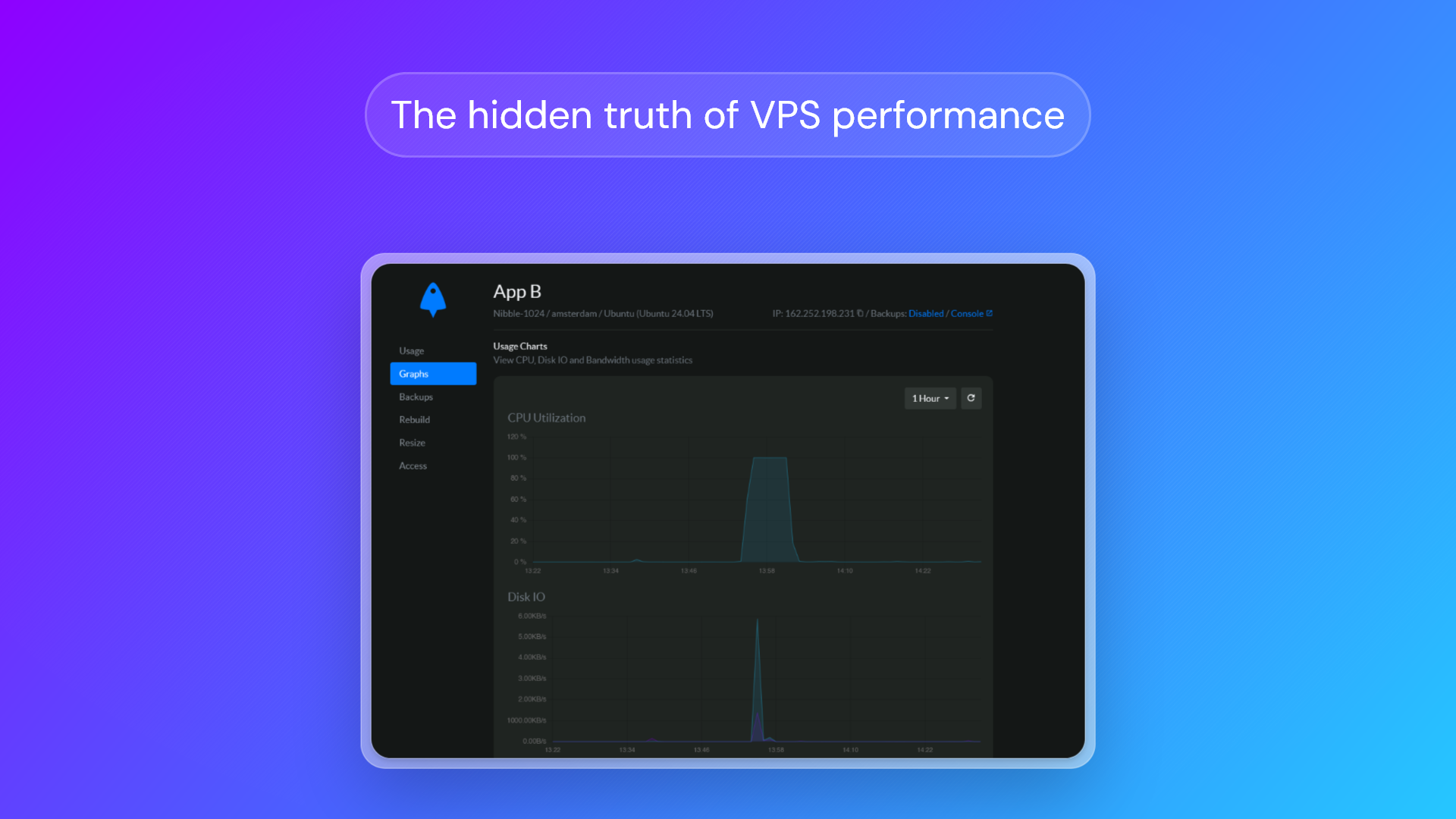
While the VPS industry is often sold as less predatory than shared hosting, it has a dark secret: most providers are betting against their customers. To take a popular DevOps analogy, they treat their VPS hardware like cattle — disposable, stuffed, and built on the cheapest consumer-grade hardware possible.
Perhaps the biggest misconception in virtual hosting is that "1 vCPU" is a standard form of measurement. In reality, VPS performance is impacted by a wide variety of factors, from the quality of the hardware used to the invisible 'steal time' caused by poor virtualization management.
The BitLaunch approach is to treat our servers like pets rather than cattle. We use reputable, enterprise-grade VPS hardware and carefully manage our hypervisors to ensure customers aren't constantly competing for resources. We would rather undersell and over-deliver than sacrifice stability or promise high specs that fail to perform in the real world.
Fed up with misleading practices and hidden costs? Get an anonymous VPS with BitLaunch.
That said, you shouldn't just take our word for it. One of the major advantages of a VPS over shared hosting is that you have full control over the server. That includes the ability to test and verify that your provider's VPS performance meets expectations. Before you do so, however, it's important to understand the factors that influence VPS performance and how providers manipulate customers into thinking they're getting a better deal than they actually are. We'll be covering:
- What influences VPS performance?
- What to look for in VPS hardware
- The Dark Secret of the VPS Industry: Overselling
- How to check your VPS performance
- How to choose your VPS server config
- VPS server use cases and config recommendations
- Choosing value over price
- FAQs
What influences VPS performance?
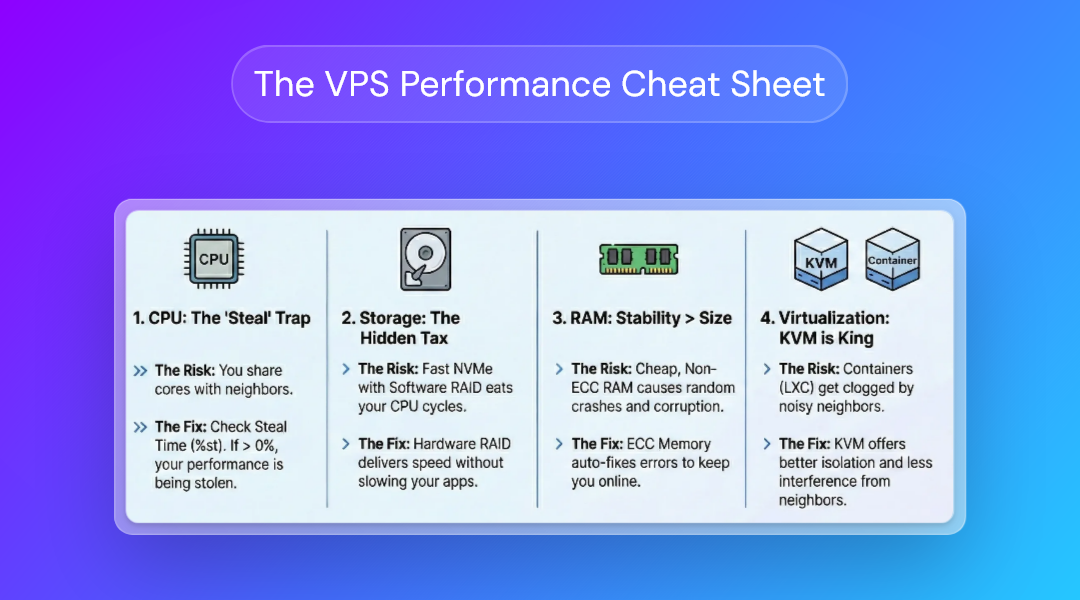
Anybody who has rented a VPS before will know the basic specifications: CPUs, RAM, storage, and transfer. Ultimately, it's quite simple for consumers — higher numbers mean better VPS performance. However, things get a lot more nebulous when you start to compare the same specifications across different VPS providers. 1GB/1CPU on one provider can have significantly better performance than on another.
Our intention is to give users the knowledge to focus on the hardware they're actually paying for rather than the marketing promises of shady providers. That starts with understanding what factors influence VPS performance and when they're important.
CPUs & steal cycles
You'll notice that providers (including us) usually describe CPU specs as "1 CPU or 1vCPU" rather than "1 CPU core". This is because you're rarely given a dedicated physical core on a VPS. Instead, the hypervisor, which splits a server into several distinct systems, gives you "execution time" on a physical core. What all this means isn't as important as the impact it has: if the provider oversells the server and puts too many users on one chip, the hypervisor forces your virtual server to wait its turn.
In Linux, this waiting period is measured as Steal Time (%st). It can have a major impact on your application's responsiveness, regardless of how powerful the CPU is on paper. A steal time above 0.0% means that the host is forcing your application to pause while it waits for others to complete their computation. The higher the percentage, the more lag it's going to cause.
The specific CPU hardware used can also have a major impact. Anybody who has built a PC will know that there can be a major difference in performance between a low-end CPU and the best CPU on the market. The same is true with servers, with VPS performance affected by:
- Clockspeed (GHz): For some VPS server use cases, clockspeed (measured in GHz) is king. Use cases such as Minecraft server hosting only use a single thread. As a result, a 4-core CPU at 2.0 GHz will perform worse than a 2-core CPU at 4.0 GHz.
- Core count: Other use cases, where multiple tasks can be handled in paralell, benefit more from the number of cores. Use cases such as web hosting, database handling, or code compiling, are more performant when they can be split across multiple cores.
- CPU Generation & IPC: Adding to the confusion, a 3.0 GHz processor from 2015 will be significantly slower than a 3.0 GHz processor from 2024. This is because newer CPU architectures have a higher IPC, which means they can do more math in a single clock cycle when compared to older chips. Budget VPS providers often buy consumer gear that offers higher specs on paper that don't translate to the real world.
- L3 Cache Contention: CPUs have a tiny memory bank called L3 cache, which stores the data a CPU needs right now. L3 cache is shared among all cores. If a "noisy neighbor" on your VPS hypervisor is running a cache-heavy workload, they can flush your data out of the cache. This forces your CPU to fetch it from the slower RAM, slowing down your server and causing micro stutters. The more a provider oversells, the more likely this is to happen.
We use enterprise hardware (such as Intel Xeon Gold) for our servers, and monitor metrics such as steal time obsessively to ensure we aren't overselling. Our focus isn't on providing the best hardware available — we don't want you paying hundreds of dollars a month for a 1GB/1CPU — but on providing great value at any given specification.
BitLaunch uses modern DELL hardware with Intel Gold CPUs and fast Samsung enterprise SSDs. Try our Bitcoin VPS for free today.
Storage performance
The main number users search for when selecting a server configuration is the amount of storage they'll receive (i.e. 20GB SSD vs 100 GB). In hosting, however, the speed of an SSD can prove quite important. The faster a drive can read and write data, the faster it can deliver it to the end user of a website or application. Storage performance is dictated by a few critical factors.
Throughput
Measured in MB/s, throughput determines the raw volume of data that can be transferred in a specific amount of time. A high throughput is primarily useful when reading or writing large files. For example, when downloading a backup file, streaming media (Plex, Jellyfin), or downloading/playing a video game.
IOPS
Input Operations Per Second (IOPS) is useful for a much wider variety of server tasks. It determines how many distinct tasks your drive can handle at the same time. More IOPs equals faster websites, faster database queries, and a snappier operating system — provided you aren't bottlenecked by other hardware.
I/O Contention
Just like the CPU, storage performance can get bogged down by noisy neighbors. If a provider oversells, you'll end up with I/O Wait (%wa), where another user's storage-heavy task will essentially lead to a queue, causing your application to have to wait for resources to become available.
The interface (NVMe vs SATA)
| Feature | NVMe (Software RAID) | SSD (Hardware RAID 10) |
|---|---|---|
| Raw Speed | Very High (Theoretical) | High (Practical) |
| CPU Impact | High (Eats CPU cycles) | None (Offloaded to card) |
| Consistency | Low (Fluctuates under load) | High (Dedicated controller) |
| Redundancy | Often low (RAID 0/1 to save cost) | Max (4+ Drive Redundancy) |
NVMe storage has significantly less latency than SATA SSDs, which reduces the time to first byte (TTFB). While you probably won't notice the difference in regular desktop use, an NVMe can be significantly faster in tasks such as loading a database when it is larger than the system's RAM, provided the storage capacity is equal (i.e., 1TB vs 1TB). NVMe's higher maximum IOPS count can be extremely useful for web hosting tasks.
However, this does not mean that NVMe storage is a no-brainer. Most VPS providers charge significantly more to rent an NVMe VPS with the same amount of RAM/storage capacity/vCPUs as SSD hosting. As a result, from a value perspective, SSDs are often the better choice at the same price point. For example, a 16GB/6 CPUs/320 GB SSD Digital Ocean VPS is $45 cheaper than its closest available NVMe VPS, which has the same RAM/storage capacity but just 2 vCPUs. In 90% of use cases, latter will be slower due to the imbalance between its CPU and storage.
Exacerbating this is the fact that many budget providers that use NVMe drives use software RAID. This requires the CPU to work very hard, contributing to steal time; the CPU is too busy managing the data flow to focus on actually running your application. This is essentially a hidden storage tax on your CPU — the provider sells you vCPUs for your apps, then steals those cycles back to power the storage array.
At BitLaunch, we take the middle ground of combining SSDs with Hardware RAID 10. This allows us to still offer high practical speeds, but with no CPU impact, a high level of consistency, and a lot of redundancy should a drive fail.
RAM & error correction
Most people believe that a server with more RAM will perform better than one with less. However, while this is generally true for desktop PCs, there's more nuance when it comes to servers.
ECC vs Non-ECC memory
Some budget VPS providers buy standard, non-ECC memory because it's around 20% cheaper than ECC RAM. This allows them to offer customers more RAM capacity for their money.
But it has a hidden cost: stability. When a system with Non-ECC RAM flips a bit (whether from electrical interference or cosmic rays), it can lead to full server crashes or database corruption. ECC RAM, however, has a special chip that detects such errors and fixes them instantly.
ECC memory is a great example of why stability and performance are intertwined. You can obsess over MHz or GB all you like, but both of those values are zero when your server is turned off. You'll lose far more to reboots, restarting tasks, or recovering corrupted data than you ever would to a gigabyte more RAM.
RAM bandwidth
Just like CPUs, RAM has a clock speed. 8 GB of DDR3 RAM at 2400 MHz is going to be slower than 8 GB of DRR5 at 5600 MHz, provided everything else is equal.
RAM speed isn't the be-all and end-all. Most of the time more RAM is better than faster RAM. However, testing RAM speed is important when comparing similar configurations across VPS providers. It allows you to determine whether you're getting more for less, or just plain less for less.
Virtualization technology
KVM is the gold standard for performance consistency when compared to older tech like Xen or containers such as LXC/OpenVZ. In container-based hosting (LXC), the host server needs to manage every process from every user individually. As a result, when your neighbor runs a script that spawns hundreds of threads, the CPU scheduler gets clogged, and your application experiences significant slowdowns.
KVM treats your entire VPS as a single unit. The host schedules your "box" efficiently, ignoring whatever chaos is happening inside other users' containers. It also uses VirtIO drivers, which allow your VPS to communicate directly with the host's hardware, enabling near-native speeds for disk I/O and network traffic. Additionally, KVM allows for nested virtualization, which enables use cases such as running emulators in a VPS
Get a KVM VPS on BitLaunch and use our nested virtualization functionality to run an Android emulator and more.
What to look for in VPS hardware
We've covered the theory behind VPS performance, but how should you put it to use in the real world when selecting your provider and configuration?
- ECC memory: Ask your provider whether they use ECC memory or check their technical specifications if available.
- KVM virtualization: Serious VPS providers will be using KVM virtualization and will mention it in their marketing material. There are few advantages to using a VPS that uses LXC or Zen instead.
- Hardware RAID: We recommend using providers who utilize hardware rather than software RAID, as software RAID has a negative impact on CPU performance.
- Enterprise hardware: The more enterprise hardware a VPS provider has, the better. Unlike consumer hardware, enterprise hardware is designed to run 24/7 without issue. You'll experience better uptime, fewer errors, and generally better performance, since consumer hardware slows down as it degrades.
- High random read/write IOPS: This is the most important metric for server storage performance. We'll get into what IOPS you'll want for different use cases later, but to give you a general idea, a large website might use 3000+ IOPS, and a database server may want 5,000-10,000, depending on query complexity and concurrent users.
- No (or low) steal values: You generally want to avoid hosts with significant CPU and I/O steal. It usually means they're overselling servers, and you can expect your performance to degrade even further down the line.
- High bandwidth quality: You should look for providers that use reputable ASNs, have low
lossandstdev, and good, stable throughput. Remember, bandwidth quantity is cheap. Bandwidth quality (consistency) is what costs the money. A server that jumps straight to a local ISP or a generic exchange point (likeix.net.brormsk-ix), is relying 100% on peering. This works fine locally, but causes massive lag for international users. Budget carriers, meanwhile, oversell their capacity, leading to high latency and jitter, particularly at peak times.
Perhaps the biggest and most obvious indicator of quality VPS hardware, however, is price. Providers selling high spec at low prices are almost certainly using cheap gear. Quality is bound to reduce rapidly over time as more customers compete for resources on the hypervisor — exacerbated further by the attractive pricing. In other words, the age-old adage stands true: if it sounds too good to be true, it probably is.
The "dark secret" of the VPS industry: overselling
Building BitLaunch over the past eight years has required a ton of background work, liaising with data centers, optimizing our server performance, and dealing with outages. One thing that has become abundantly clear during this process: a significant portion of the VPS industry is overselling. We've touched on this already, but it's worth talking about what overselling is and what it means for you as a consumer.
How does overselling work?
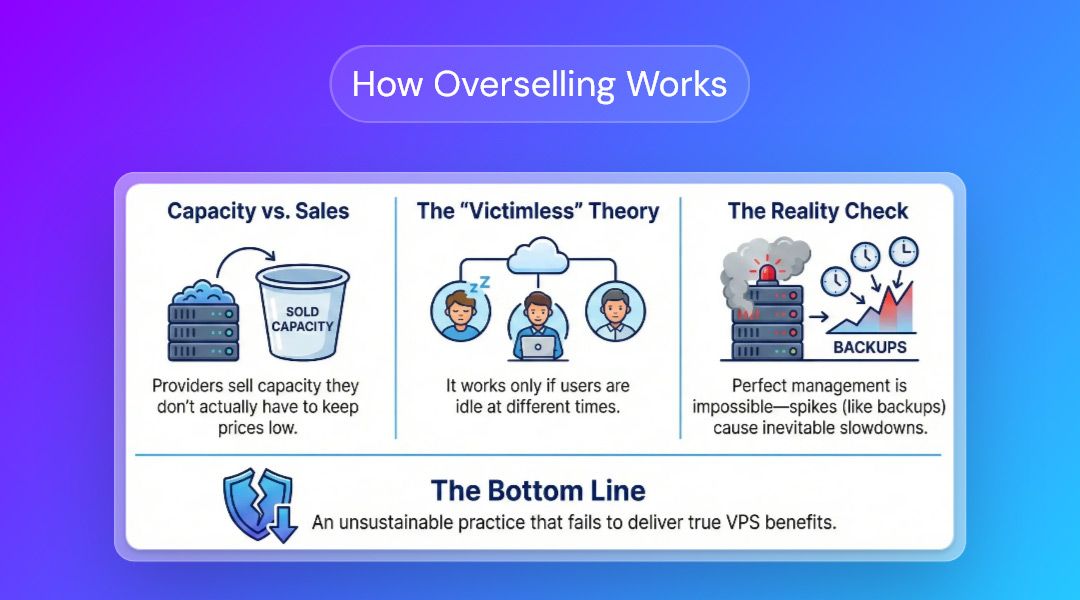
Overselling is when a provider sells more VPS hardware capacity than they actually have. To give a simple example, a provider might have 128 GB of RAM available but sell 256 GB to customers, betting that they won't all use it at the same time.
Overselling is in some ways a function of KVM VPSs, and it's how many providers make their money. If managed perfectly, it feels like a victimless crime: everyone gets the resources they need, when they need them. In practice, however, this is impossible to do. Demand is not entirely linear or predictable; there's nothing an overselling host can do if everyone decides to run a backup at midnight.
As a result, we believe it's a dangerous game. The competitive pressures of the VPS industry have created a market where providers feel they have to oversell to maintain competitive pricing. We believe this has created a "race to the bottom" that is largely unsustainable and fails to deliver on the core benefits of renting a VPS server.
How overselling impacts you
VPS marketing materials promise users "guaranteed resources" that enable predictable, dependable performance when compared to shared hosting. This is only true if a provider is not overselling.
Overselling leads to the "noisy neighbor" effect when demand is high. For the consumer, this means higher "steal time" on your CPU, I/O wait on your storage, and limited RAM capacity. This can slow down anything from database queries to page load speeds and video streaming performance. For some users, a small amount of overselling may be an acceptable trade-off initially for lower prices. However, performance typically continues to degrade as more users buy in. You end up paying the same amount for less.
BitLaunch's stance on overselling
At BitLaunch, we prefer to undersell and overdeliver. Having spare overhead on our hypervisors allows us to use it as a shock absorber for traffic spikes, ensuring your performance remains stable and you get what you paid for.
This philosophy extends to our hardware. We use reputable bandwidth providers, trusted data centers, and enterprise hardware. Our servers often out-benchmark competitors with the same configuration while offering an average network uptime of 99.9%. Stable, reliable performance is always better than a theoretical high spec that can never actually reach its peak.
Sign up for BitLaunch today to launch a Windows or Linux VPS in seconds.
How to check your VPS performance
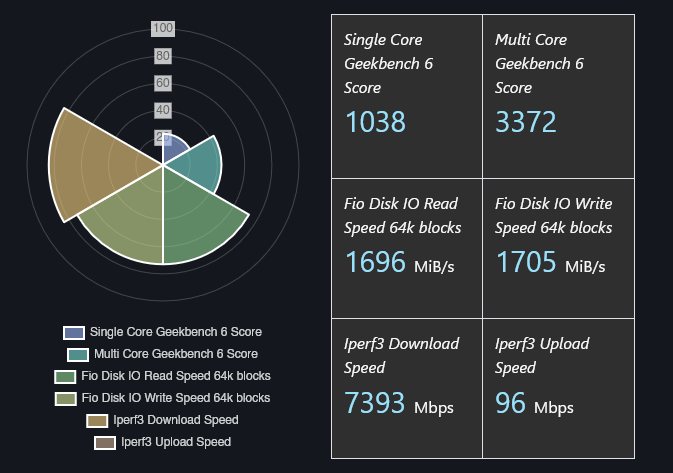
The good news is that while there are many shady hosts, there are dozens of ways to audit your VPS performance, checking for overselling, software RAID, cheap bandwidth providers, and more.
How to benchmark VPS performance with YABS
Yet-Another-Bench-Script (YABS) is the gold standard for Linux server benchmarking. It tests for:
- Processor model, cores, and clock speeds
- RAM capacity
- Disk capacity
- VM type
- ISP and ASN
- Disk speed (random read/write)
- Network speed (Send, receive, ping)
- Processor single and multi-core benchmark (Geekbench)
Running YABS is so simple that we recommend doing it for every server you rent. Just paste the following in your command line:
curl -sL https://yabs.sh | bashThe difficult part when assessing VPS benchmarks is not having a frame of reference for whether they're good or bad. As a result, it may be beneficial to upload your results to VPS Benchmarks to compare them with trusted, high-quality providers such as BitLaunch.
You can view YABS results for each BitLaunch server config on VPS Benchmarks below:
1GB RAM/1 CPU | 2GB RAM/2 CPU | 4GB RAM/2 CPU | 8GB RAM/4 CPU | 16GB RAM/6 CPU | 32GB RAM/8 CPU | 64 GB RAM/10 CPU
Assess bandwidth quality with mtr
My Traceroute, or mtr is a useful tool for auditing the networking side of your server. It enables you to test the latency between the server and your local device, which is key for use cases such as sneaker bots and forex. More importantly, though, it gives you an indicator of the ASNs your provider is using, which can significantly impact uptime and stability.
We'll break down a typical mtr from a BitLaunch server so that you know what to look for.
mtr -z 32.91.3.132
Host                                     Loss%   Snt   Last   Avg    Best   Wrst   StDev
1. AS3223  5.254.123.34                  0.0%    189   20.8   16.0   1.9    102.2  13.6
2. AS3223  ams-at1-01c.voxility.net      0.0%    189   0.5    0.5    0.3    3.5    0.3
3. AS3223  ams-eq6-01gw.voxility.net     0.0%    189   0.4    0.4    0.3    0.7    0.1
4. AS???   ams-ix.bt.com                 0.0%    189   1.1    1.9    0.9    28.6   3.5
5. AS5400  t2c3-et-5-0-5.uk-lof.gia...   0.0%    189   6.2    6.6    5.7    42.2   4.1
6. AS5400  166-49-209-133.gia.bt.net     3.7%    189   6.5    6.4    5.8    29.8   2.0
7. AS2856  62.6.204.22                   0.0%    189   6.9    7.4    6.6    38.0   3.5
8. AS2856  109.249.132.35                0.0%    189   6.6    6.6    6.5    14.5   0.6
9. AS2856  213.121.52.195                0.0%    189   6.5    6.5    6.3    8.9    0.2
10. AS2856 213.121.52.194                0.0%    189   6.4    8.2    6.2    25.5   3.0
There are a few key indicators that this server is using a premium bandwidth provider:
- The ASN used is Voxility, which is considered a top-tier, premium ASN for data centers and DDoS protection.
- The most important hop is when the bandwidth provider (Voxility) hands it off. We can see that in this case, that's between hops 3 and 4. The important thing to note is that Voxility hands off the packets directly to the ISP (bt.com), bypassing the public internet backbone rather than first going through an intermediary budget provider (Cogent, Hurricane Electric, etc.). This ultimately means lower latency, less risk of congestion, and better accountability along the chain.
- Aside from a few false positives, the ping and packet loss is good. The delay on the first hop (high worst) is most likely due to the VPS delaying ICMP packets so that it can focus on routing traffic, since the latency isn't passed on to the other hops. The 3.7% packet loss at hop 6 is also a false positive, since it doesn't cascade to the other hops — if packets are truly lost, the percentage won't go back to zero on the next hop.
In other words, the results suggest a route with high stability, no congestion, no routing loops or detours, and good hardware. If you still struggle to assess your own mtr, try pasting your report into an LLM for analysis. Just make sure to follow up its answer with additional research to verify it.
How to check for ECC memory
While unreliable on VPS servers, you can use the sudo dmidecode -t memory command to check for ECC. Note that this may sometimes show a server as not having ECC when it does. If the Error Correction Type is marked as Multi-bit ECC, however, it almost certainly has it.
How to check for CPU steal and IOWait
A high CPU steal value is a key indicator that a VPS provider is overselling, leading to latency and low response time. Cheap providers bet on users not knowing about CPU steal, and therefore not noticing that they are being sold a lie.
Another form of steal is IOWait. If you or a noisy neighbor is running an IO-intensive task, your CPU may have to wait for your SSD before it can continue with its task. While some IOWait is normal, high values suggest that your server is poorly balanced or the provider is overselling.
Thankfully, once you know what you're doing, CPU steal and IOWait are very easy to check for. You can view both in real time using the top command on any Linux system:
top
top - 13:16:24 up 6 min,  1 user,  load average: 0.06, 0.06, 0.04
Tasks:  96 total,   1 running,  95 sleeping,   0 stopped,   0 zombie
%Cpu(s):  0.0 us,  0.0 sy,  0.0 ni,100.0 id,  0.0 wa,  0.0 hi,  0.0 si,  0.0 st
MiB Mem :    961.7 total,    236.2 free,    295.0 used,    579.5 buff/cache
MiB Swap:      0.0 total,      0.0 free,      0.0 used.    666.6 avail Mem
The value next to st above your table is the steal percentage. A value of 5% and above is going to cause you issues. If it is consistently high, there's nothing you can do beyond asking the VPS provider to change their practices — no amount of optimization will fix CPU steal.
IOWait is found next to wa. Occasional IOWait values between 0.1 and 5 aren't a big deal. This occurs normally when a server is logging or performing light database tasks. If your IOWait is consistently in the 10+ range, however, it's an indication that your disk is becoming a bottleneck. At the 25+ mark, you may start to notice your server becoming unresponsive as processes pile up.
Asessing IOWait performance loss
top will tell you whether there's IOWait, but it doesn't provide you with much detail. To dig further into the issue, you'll want to use iostat. For example:
sudo apt install sysstat -y
iostat -x 1
Stress testing and checking historical steal
The tricky thing about CPU steal is that it's not always constant. In some situations, steal may only show up and peak times or when the CPU is under load. We recommend running a stress test on your server while checking for steal, as well as using sar to check CPU steal over an entire day.
Stress testing your server
There are various stress test tools for Linux, but the easiest to remember is stress. You'll need to install it using your distro's package manager, such as:
sudo apt install stressOnce stress is installed, you can run a test with the command:
stress --cpu 4 --timeout 30sYou should modify the value after cpu to your server's core count to ensure the CPU reaches 100% load. You can then check top again and ensure the st value remains at 0.
You can similarly stress your SSD by transferring a large file:
dd if=/dev/zero of=testfile bs=1G count=1 oflag=directChecking historical steal with sar
Realistically, steal rate can rise any time a neighbor starts a noisy task, and you aren't going to sit there with your eyes glued to top all day. sar will allow you to check performance history across the day, including CPU steal rate and iowait:
sar -u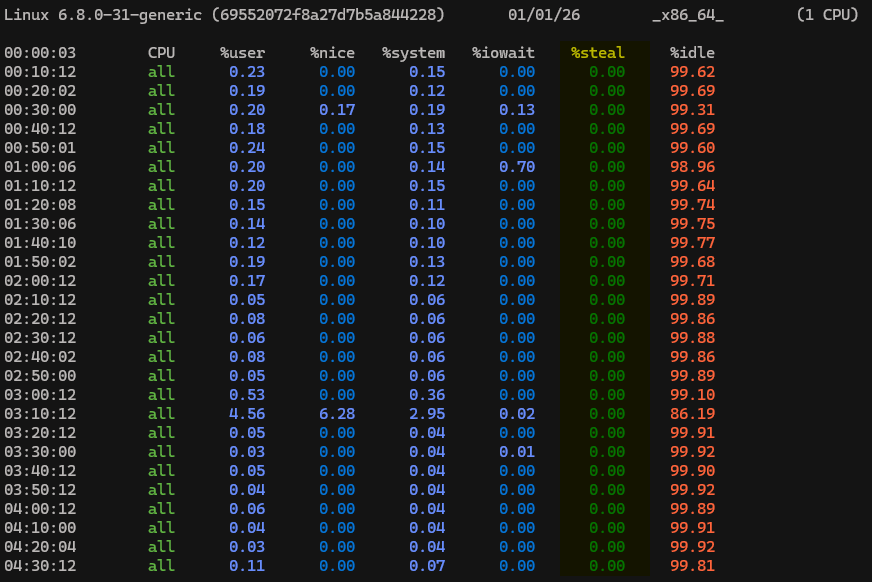
How to check for software RAID
You can check for hardware/software RAID with the command cat /proc/mdstat.
This doesn't detect hardware RAID with a 100% success rate since virtualization can mess with hardware detection. That, if the command returns something like the following, hardware RAID is enabled:
Personalities : [raid0] [raid1] [raid6] [raid5] [raid4] [raid10]Software RAID, meanwhile, will always return the following:
md0 : active raid...How to choose your VPS server config
The configuration you select when launching your server is naturally the biggest choice you can make to impact your VPS performance. At BitLaunch, we allow users to upgrade their servers to a higher-spec model at any time without data loss and with minimal downtime. However, we are unable to offer server downgrades, as this may lead to storage issues.
Want to view our server configs? Start free by signing up for an account and asking for some free credit via livechat.
Choosing the right server specification is therefore still important. There are several aspects to consider when deciding on a configuration, including:
- What are you going to run? Hardware requirements can vary wildly depending on the use case. Web servers benefit most from RAM and network, game servers single-core CPU speed, VPNs primarily network, etc.
- What resources do you actually need per use case? Check the minimum and recommended requirements for the software you'll be running, or check our recommendations below for a general estimate.
- Will you set up containers? Many people forget that containers have overhead — they cause 10-15% buffer in RAM and it costs CPU cycles to route traffic between them. Make sure you account for this when choosing your configuration if you plan to use Docker, Kubernetes, etc.
- How many concurrent users do you expect? The number of concurrent users has a significant impact on the resources you'll need for almost any use case. More users means more database queries, more files downloaded, more information stored, and so on.
- Where are your users located? The location of your VPS is one of the most important factors in its perceived speed. Every 1,000 km of distance adds roughly 10-15ms of round-trip latency. The best CPU in the world in Sydney would still be unusable for real-time tasks in London. Conversely, for static content such as a blog, the use of a CDN may render location less important. If you have to choose between specification and location, keep all of this in mind.
- What are your users downloading? If the answer is text files (JSON, HTML, etc), latency is more important than bandwidth volume. If they're streaming video or downloading large assets, you'll want a plan with unlimited or high bandwidth limits.
VPS server use cases and config recommendations
| Use case | Recommended VPS configuration |
|---|---|
| Website / blog hosting | BitLaunch 2–4 GB RAM · 2 vCPU · SSD/NVMe |
| Popular e-commerce (WooCommerce, Magento) | BitLaunch 4–16 GB RAM · 2–6 vCPU · SSD/NVMe |
| Game servers (Minecraft, Valheim, etc.) | BitLaunch 8–32 GB RAM · 2-8 vCPUs · SSD/NVMe |
| Cloud development environments | BitLaunch 1–32 GB RAM · 2–8 vCPU |
| Sneaker bots | BitLaunch 8–16 GB RAM/ · Vultr HF or DO CPU-Optimized |
| VPNs / Proxies | BitLaunch 1–2 GB RAM · 1–2 vCPU |
| Self-hosting (Plex, Matrix, Nextcloud, mail) | BitLaunch · storage-heavy tiers · GPU optional for Plex |
| AI workloads (LLMs, image gen, CUDA) | Vultr NVIDIA A40 GPU |
| Android emulation | BitLaunch 8-16 GB RAM · 2-4 vCPUs · GPU optional |
| Productivity (cloud desktop) | BitLaunch 4–8 GB RAM · 2-4 vCPUs |
| Forex trading servers | BitLaunch 2–4 GB RAM · low-latency region |
| Discord / Telegram bots | BitLaunch 1–2 GB RAM · 1 vCPU |
| Bitcoin full node | BitLaunch 8 GB+ RAM · ≥1 TB SSD · unmetered transfer |
| OpenClaw | BitLaunch 4-8 GB+ RAM · ≥100 GB SSD · unmetered transfer |
Website/blog hosting
Websites and blogs are a difficult use case to configure for because there are so many variables. The best way to determine the right server configuration for you is to benchmark your site. There really is no substitute for deploying your site, monitoring it, and scaling as required.
That said, we understand that you still need to know where to start. At BitLaunch, we like to ask our customers questions such as:
- Is it a static, dynamic, or CMS site? Sites that aren't fully dynamic can typically rely on caching, which can drastically reduce the resources required.
- How many visitors will the website to have, and how "spiky" will the traffic be?
- What are the visitors doing? Are they logged in, and how many pages do they visit?
- What technologies are you using? For example, Nginx,Apache, Node, MySQL,Postgres, or WordPress.
Unless you have a reason to expect your site to grow rapidly spec their server based on what it needs now rather than what they think it will need in the future. A common mistake we see is users choosing a higher config because they have idealized expectations of how quickly their site will grow. It's normal for new sites to see only dozens of visits in the first few months, and many don't break into the hundreds in the first year. It can take quite a while for marketing and SEO efforts to begin to bear fruit.
All that said, here are some sensible starting points for a website:
- New WordPress/Ghost blog: 1-2 GB RAM, 1-2 vCPU, SSD/NVMe storage
- Established content site or new e-commerce site: 4 GB RAM, 2 vCPU, SSD/NVMe storage
- Popular blog/business/e-commerce site: 8 GB RAM, 4 vCPU, SSD/NVMe storage
Remember, it's better to start lower and scale than overspec, as it's much harder to downgrade than upgrade.
Game server hosting
Game servers are, fortunately, easy to work out a baseline spec for, provided you aren't running a lot of mods or plugins. Each game has guidelines for minimum requirements in its documentation. We've extrapolated some of the most popular to the VPS-focused list below:
- Minecraft (Java Edition): 2 GB RAM, 2 vCPUs, 1 GB+ SSD/NVMe
- Palworld: 8 GB RAM (16 GB recommended), 4 vCPUs, 40 GB+ SSD/NVMe
- ARK Survival Ascended: 16 GB RAM, 4 vCPUs, 11 GB+ SSD/NVMe
- Rust: 14 GB RAM, 4 vCPUs, 15 GB+ SSD/NVMe
- Valheim: 8 GB RAM, 4 vCPUs, 2 GB+ SSD/NVMe
- FiveM (GTA V online): 4 GB RAM (8 recommended), 4 vCPU, 72 GB+ SSD/NVMe
- SA-MP (GTA San Andreas online): 1 GB RAM, 1 vCPU, 1GB+ SSD/NVMe
Unless you already have an active player base, we recommend you start with these baseline specs and just scale up as needed. It should be quite obvious when you need to upgrade — your players will start to complain about lag, crashes, etc.
Cloud development
The config for your cloud development environment will depend on whether you're using Vim/Nano or VS Code Remote, as well as your stack. If you're using Vim + Go/Rust, you might be able to get away with the lowest 1GB/1CPU VPS. Once you start using VSCode with Docker, Node.js/React etc, you're going to need more RAM.
Here are some general starting points for different developer "profiles":
| Developer Profile | Typical Stack | Recommended Config |
|---|---|---|
| The Minimalist | Vim/Neovim, Go/Rust/C++, No Docker | 1 vCPU, 2 GB RAM |
| The Standard Web Dev | VS Code Remote, Node.js, React, 1-2 Docker containers | 2 vCPU, 4 GB RAM |
| The Power User | JetBrains Gateway, Java/Kotlin, Heavy Docker usage | 4 vCPU, 8 GB RAM |
| The Data Scientist | Jupyter, Python, Pandas (Large Datasets) | 4-8 vCPU, 16-32 GB RAM + GPU |
Sneaker bots
The best sneaker bots are on Windows, so you'll want to rent a Windows RDP VPS. At BitLaunch, we recommend a minimum of 2GB/2CPU just to run Windows. Sneaker bots themselves also need a good amount of RAM and CPU cores to run all of those concurrent purchase attempts.
While resource usage can vary between bots, here's a rough estimate based on the most popular bots:
| Feature | Beginner (Entry Level) | Mid-Tier (Standard) | High-Tier (Power User) |
|---|---|---|---|
| Target User | Learning; 1-2 bots for personal pairs. | Reselling; multiple bots for profit. | "Cook Group" owners; bulk buying. |
| Concurrent Tasks | 10 – 50 Tasks | 100 – 300 Tasks | 500+ Tasks |
| vCPU Cores | 2 - 4 vCPUs (Shared OK) | 4 - 8 vCPUs (Dedicated preferred) | 16 - 32 vCPUs (Bare Metal) |
| RAM | 4 GB - 8 GB | 16 GB | 32 GB - 64 GB |
| Storage | 50GB SSD | 80GB NVMe/SSD | 100GB+ NVMe SSD (Raid 0) |
Just keep in mind that network latency may be the most important spec for sneaker bots. The best bot in the world isn't going to cop if you have 300ms ping. Make sure you benchmark your network using the tests above before you commit to a sneakerbot host long term.
VPNs/proxies
Let's keep it simple: you don't need more than a 1GB/1CPU server to host a proxy or VPN on a VPS for 1-4 devices. Any provider that tells you otherwise is just trying to get more money out of you.
If you're providing VPN access to a large family or company, then you're almost always better off launching multiple 1GB/1CPU VPNs rather than, say, an 8 GB/4 CPU server for 100+ people. There are several reasons for this:
- Most VPS providers limit their download/upload speeds to 1-2 Gbps per server. A single high-spec VPS server with many users will lead to poor speeds for users, especially at peak times.
- 1 VPS server = 1 IP address. If a single user does something to get banned from a website or service, it becomes inaccessible to everyone.
- More servers means more geo-diversity. You can have servers in different parts of the world to unlock different streaming catalogs etc.
- Some providers have a per-server bandwidth transfer cap. For example, a Vultr 1GB/1CPU server is capped at 1 TB, after which you pay $0.03/GB. Dozens of users on the same server are going to hit that cap quite quickly if they're streaming video or downloading games.
In short, aside from some niche use cases, you should scale your VPN/proxy servers horizontally rather than vertically.
Don't want the hassle of setting up a VPN yourself? Try our BitLaunch VPN offering for high-speed VPNs in seconds — no config required.
Self-hosting
Self-hosting is an increasingly popular way to take back control over your data and avoid ballooning subscription fees. However, self-hosted applications can place a heavy workload on VPS hardware. Applications often run continuous background tasks such as transcoding video, indexing files, or syncing databases. This is fine if you spec your server correctly, but performance can be affected significantly by overselling — check your steal values before you continue.
That said, here are some baseline recommendations for different self-hosted services:
- Media streaming (Plex/Jellyfin): 4 GB RAM, 2-4 vCPUs, 100 GB+ SSD/NVMe, GPU (optional). If you're going to be doing transcoding on your server, you'll want a high frequency CPU or a server with a dedicated GPU (such as our A40 GPU VPSs from Vultr). Naturally, you'll also want as much storage as you can afford.
- Cloud storage (Nextcloud/Owncloud): 2-4 GB RAM, 2 vCPUs, 100 GB+ SSD/NVMe. The main specification for cloud storage is obviously the SSD capacity, but Nextcloud is also notoriously RAM and database intensive. We recommend 4 GB RAM to enable Redis caching, which leads to smoother interface navigation and less chance of crashing during thumnail generation.
- Chat servers (Matrix Synapse/Delta Chat): 1-2 GB RAM, 1-2 vCPUs, fast NVMe/SSD storage (personal use/small company). Matrix isn't too heavy on the CPU/RAM for smaller federations, but fast storage is important for avoiding message lag. Of course, if you're hosting a larger federation with hundreds or thousands of concurrent users, requirements can quickly balloon up to 8+ vCPU, 32GB+ RAM.
- Mail servers (Mailcow): 2-4 GB RAM, 2 vCPUs, 10 GB+ SSD. Sending mail is lightweight, but we don't recommend using it without ClamAV and spam filtering tools in addition, which can be RAM hungry.
- Personal search engines (SearXNG): 1 GB RAM/1 vCPU. Search engines such as SearXNG tend to be very lightweight. However, it is important that your VPS's IP range is not flagged, as this may cause the queries to Google/Bing to be blocked.
- VOIP (TeamSpeak): 1-4 GB RAM, 1-2 vCPU, 25 MB+ storage. TeamSpeak is extremely efficient and can run on very modest hardware due to its proprietary audio tech. Users report being able to host 200+ concurrent users on just 1 GB RAM and 1 vCPU. We recommend you start there unless you have a very large server.
AI workloads
Local AI workloads are pretty much the ultimate stress test for VPS servers. They require large amounts of RAM, a good CPU, and often an additional dedicated GPU in combination. Even so, there's significant variance depending on the type of AI workload. LLM inference, image generation, and model training are going to require the most resources, while tasks such as AI voice/audio can run on modest hardware.
Here are some baselines for different AI workloads:
- LLM inference (Ollama, LocalAI, etc.): 8 - 16 GB RAM, 4+ vCPUs. LLMs are usually RAM-limited. Models must be loaded into memory at a rate of about 0.5-1GB for every one billion quantized parameters. Thankfully, a lot of LLMs are quite focused and efficient compared to commercial LLMs such as ChatGPT. Standard 7B or 8B parameter should run fine on a standard 8 GB VPS. Larger LLM models that specialize in multiple things, such as Mixtral 8x7B might require up to 32 GB RAM.
- AI image generation: 16 GB+ RAM, 8+ vCPUs, GPU with 8 GB+ VRAM. While you can run some AI image generation tools (such as Stable Diffusion) just on a CPU, it will take so long that you won't want to. However, despite GPUs doing most of the heavy lifting in image generation, RAM and CPU are still very important. Models must be loaded from the SSD into system RAM before they can be passed to the GPU, so you'll want at least the same amount of RAM as your GPU has VRAM. The CPU, meanwhile, it key for preparing batches of data and sending them to the GPU. If the CPU is too slow, it will throttle your performance.
- Voice/Audio AI: 4 GB RAM, 2 vCPUs, Optional GPU. Local audio transcription and TTS models are surprisingly CPU efficient in comparison to other AI workloads. That said, you'll want to consider a GPU VPS if you're transcribing longer clips — especially if you're using larger, more accurate models. In the best-case scenario, using quantized medium Whisper on the CPU, it takes around one and a half hours to transcribe a 2-hour video. A decent GPU could do the same in under five minutes.
Want a cloud GPU but don't want to sacrifice your privacy? BitLaunch's GPU VPS servers allow you to run powerful AI workloads without bogging down your personal device. Sign up here.
Android emulation
The most important specification for Android emulation on a VPS is support for nested virtualization. Without it, most emulators won't work at all.
Aside from that, RAM is usually the bottle neck, though the amount you need will vary depending on the type of emulator and the tasks you're running. Here are some baseline configurations for different use cases:
| Emulator Type | Use Case | Recommended Configuration | Important Notes |
| Containerized (Redroid, Waydroid) | Background automation, API testing, light apps. | 2 GB RAM / 2 vCPU | Runs natively on Linux without full emulation overhead. Extremely efficient for headless tasks. |
| Development (Android Studio, Genymotion) | App debugging, UI testing, CI/CD pipelines. | 4 GB RAM / 2 vCPU | Mandatory: Nested Virtualization support. Without it, the AVD (Android Virtual Device) will fail to launch. |
| Desktop Consumers (BlueStacks, LDPlayer) | 3D Gaming, Social Media Management (Windows). | 8 GB RAM / 4 vCPU | These are resource-heavy on Windows Server. Without a dedicated GPU, performance relies heavily on single-core CPU speed (software rendering). |
| Multi-Instance Farming | Running 4+ instances simultaneously (e.g., Gacha games). | 16 GB+ RAM / 8+ vCPU | The Golden Rule: Allocate 1 vCPU and 2 GB RAM for every simultaneous instance you plan to run to avoid crashes. |
Finally, you can consider using a GPU VPS server for your emulators. This will naturally enable much better graphics performance, both on games and during general browsing, and allow you to use frameworks such as OpenGL, DirectX, Vulkan, etc.
Virtual / cloud desktop
Virtual desktops are relatively easy to spec for: you can just choose the closest specification for a desktop machine designed for your use case. If you aren't that well-read on PC hardware, here are some rough baselines for different use cases across Windows and Linux.
| Use Case | Windows Specs (Rec.) | Linux Specs (Rec.) | Typical User Persona | Application Load |
|---|---|---|---|---|
| Light | 2 vCPU 4 GB - 8 GB RAM 64 GB+ SSD |
1 vCPU 2 GB RAM 20 GB+ SSD |
Frontline / Entry Call centers, data entry, kiosk users. |
• 1-3 Browser tabs • LibreOffice/Word Online • Web-based email • 1080p Video playback |
| Standard (Medium) | 4 vCPU 8 GB - 16 GB RAM 128 GB+ SSD |
2 vCPU 4 GB RAM 40 GB+ SSD |
Knowledge Worker Office admins, accountants, managers. |
• Multi-tab browsing (10+ tabs) • Spreadsheets, PDF editing • Teams / Zoom (Web Apps)* • General Multitasking |
| Heavy | 4 - 8 vCPU 16 GB - 32 GB RAM 256 GB+ NVMe |
2 - 4 vCPU 8 GB - 16 GB RAM 80 GB+ NVMe |
Power User Developers, analysts, marketing. |
• Heavy Multitasking • VS Code / IDEs / Docker • Large Databases • Image Manipulation (GIMP) |
| Performance (GPU) | 8+ vCPU 32 GB+ RAM Discrete GPU (e.g. A40) |
4 - 8 vCPU 16 GB - 32 GB RAM Discrete GPU |
Creator / Engineer CAD designers, video editors, 3D renderers. |
• Blender / CAD Software • Video Editing (DaVinci) • 3D Modeling • Machine Learning tasks |
Keep in mind that, however, that latency (largely determined by location and bandwidth quality) is just as important. A 64 GB/10 CPUs UK VPS is still going to feel sluggish if you're based in Sydney.
Forex trading
Forex trading using applications such as MetaTrader 4 only requires modest system requirements. In our testing, a 2 GB/2 vCPU VPS on Linux should work just fine for the vast majority of traders.
The main bottleneck for Forex will instead be latency. Ideally, you want a server with a ping of < 20ms. For scalping strategies and high-frequency trading, a server with ping of between <1ms–5ms is ideal to avoid slippage.
Ping should be measured to your platform's trading server, not their website. You can find this information inside MT4 in the bottom-right corner of the Window.
Discord/Telegram bots
For basic Telegram or Discord bots, pick the cheapest, lowest spec VPS your provider offers. BitLaunch's 1 GB/1 CPU servers should be fine for most bots. You can bump that up to 2 GB/2 CPUs if you're running a complex bot that needs to hold a lot of information in memory.
Hosting Bitcoin nodes
Bitcoin nodes are mostly intensive on storage capacity, I/O, and bandwidth. You'll want a high-speed, high-capacity SSD or NVMe drive without I/O wait. That said, there are a few different options for hosting Bitcoin nodes: full, pruned, and lightning nodes can have significantly different requirements.
If you're only using your VPS to host a Bitcoin node and you're on Linux, we recommend the following as a baseline:
| Node Type | CPU | RAM | Storage | Bandwidth |
|---|---|---|---|---|
| Pruned Node (Budget Friendly) |
2 vCPU | 4 GB | 80 GB+ SSD/NVMe (Prunes old data) |
2 TB / mo (Inbound Heavy) |
| Archival Node (Full History) |
2 vCPU (Dedicated) |
8 GB | 1 TB+ SSD (Growth headroom) |
5 TB+ / mo (Outbound Heavy) |
| Lightning Node (Routing) |
4 vCPU | 8 GB+ | 1 TB SSD (Fast I/O Critical) |
Unmetered (Low latency) |
OpenClaw
OpenClaw's official requirements state that it can run on as little as 1 GB of RAM/vCPU, but that led to "out of memory" errors during installation in our testing. You'll therefore want 2GB/2CPU at the very least. Between 4-8GB RAM is our reccomended sweet spot. Of course, if you'll be using a local LLM, you need a GPU VPS with at least 8GB VRAM.
 BitLaunch
Choosing value over price
Regardless of configuration or workload, the best decision you can make when selecting VPS hardware is to choose value over price. While it's extremely tempting to pick the cheapest provider for the config you need, you're likely paying less because you're getting less than what is advertised.
That's not to say that price isn't important to us at BitLaunch. We invest a lot of time and effort in negotiating with suppliers and data centers so we can pass those savings on to our customers. However, we believe it's far more beneficial for you to get great hardware at a reasonable price than to pay less and receive less than you expected. We don't oversell, we don't use bad hardware, and we don't have hidden fees or unwanted surprises. That's our promise.
Don't believe us? Sign up for BitLaunch and test for yourself by asking our support team for free credit.
FAQs
What is Nested Virtualization?
VPS servers work by sectioning a single server up into multiple virtual ones (virtual machines) and renting them to customers. Nested virtualization allows users to run additional virtual machines (as well as some Android emulators, etc.) despite the fact that their VPS server is already virtualized. In other words, it's a mechanism to allow you to run a VM inside a VM.
Why does my VPS feel slow even with low CPU usage?
There are several potential culprits, but one of the most likely is your disk. In VPS servers, speed isn't just about how fast your CPU is — how quickly your other components can get information to the CPU is important. When your storage drive is slow, your CPU has to wait on it until it can perform its task. This is called I/O Wait, and is represented by the wa value in your top command.
Disk latency, which is the time between a CPU request and the disk can start fulfilling that request, can be caused by noisy neighbors. Noisy neighbors can occur on VPS servers if a provider oversells them — other customers begin competing for your disk resources when they're performing storage-intensive tasks.
Is VPS better than dedicated server performance?
If money is no object, you can't beat a premium dedicated server for raw speed and consistency. However, VPSs almost always win for flexibility and price-to-performance.
That said, it's becoming increasingly common for providers to offer budget dedicated servers that use consumer hardware. These are rarely worth it. A similarly priced "cheap" dedicated server will usually perform much worse than a high-end VPS.
Is 32 GB RAM overkill for Linux servers?
It depends on your use case. For general desktop use and most web hosting, probably. However, if you're running AI workloads, hosting game servers, or data science, 32 GB of RAM can still be very beneficial.